
Download QuickMail AI – AI‑Powered Email Drafting Tool for Professionals
Overview
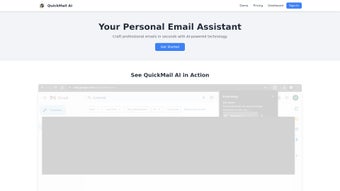
QuickMail AI is a web‑based AI writing assistant that streamlines the process of composing professional emails. By turning short prompts into well‑structured messages, the platform saves users valuable time while preserving a polished tone. Whether you’re reaching out to a client, following up on a project, or sending a quick internal note, QuickMail AI’s natural‑language engine generates coherent, context‑aware drafts that can be customized to match your personal communication style.
The service operates on a subscription model with a free trial, making it easy for individuals and teams to test the value before committing. Available through the Chrome Web Store, QuickMail AI integrates directly into your browser, letting you invoke the assistant from any web‑based email client without the need for separate installations. Support is provided via responsive email help, ensuring that any hiccups are quickly resolved.
In short, QuickMail AI is designed for anyone who wants to boost email productivity, reduce repetitive typing, and maintain consistent professionalism across every message.
Core Features
- Prompt‑Based Drafting: Enter a brief description of your email’s purpose, and the AI generates a complete draft in seconds.
- Tone Customization: Choose from formal, friendly, or neutral tones, or define a custom style to reflect your brand voice.
- Template Library: Access pre‑built templates for common scenarios such as sales outreach, meeting invitations, and follow‑up notes.
- One‑Click Insertion: Drafts appear directly within the compose window of Gmail, Outlook Web, or any web‑mail client via the Chrome extension.
- Real‑Time Editing: Edit the AI‑generated text on the fly, with suggestions for grammar, clarity, and conciseness.
- Multi‑Language Support: Write emails in English, Spanish, French, German, and several other languages without switching tools.
- Secure Cloud Processing: All content is encrypted in transit and never stored permanently, protecting sensitive information.
- Subscription Flexibility: Tiered pricing includes a free trial, a solo plan for freelancers, and team plans with admin controls.
These features collectively position QuickMail AI as a versatile solution for professionals across industries. The prompt‑based drafting eliminates the mental overhead of starting from a blank screen, while tone customization ensures that each message feels authentic. The built‑in template library accelerates repetitive workflows, and the seamless Chrome integration means you never have to leave your inbox to benefit from AI assistance. Security remains a top priority; QuickMail AI processes data in a transient manner, so you can trust that confidential details stay confidential. Whether you’re a sales representative chasing leads, a project manager coordinating tasks, or a student drafting outreach emails, the feature set adapts to fit your workflow.
Installation & Usage Guide
Step‑by‑Step Installation
- Open the Chrome Web Store and search for “QuickMail AI”.
- Click Add to Chrome and confirm the permission request.
- After installation, a small QuickMail AI icon appears next to the address bar.
- Sign up for a free trial using your email address, or log in with an existing account.
- Navigate to your preferred web‑mail client (Gmail, Outlook Web, etc.). The extension automatically injects a “Compose with AI” button into the compose window.
How to Draft an Email
Once the extension is active, click the “Compose with AI” button. A side panel opens where you can type a concise prompt, such as “Follow up on the Q3 proposal sent last week.” Choose your desired tone, optionally select a template, and press “Generate”. Within seconds, a complete draft appears, ready for review. You can edit directly in the panel or copy the content into the email body. The tool also offers a “Regenerate” option if the first draft doesn’t meet your expectations.
For power users, QuickMail AI supports keyboard shortcuts (Ctrl + Shift + M) to open the panel instantly, and a “Smart Suggest” mode that offers inline phrase recommendations as you type. The usage analytics dashboard (accessible from the extension’s pop‑up) provides insight into how many drafts you’ve generated, average time saved, and which templates are most popular, helping you fine‑tune your workflow.
Because QuickMail AI runs entirely in the browser, there’s no need for additional software installations on Windows, macOS, Android, or iOS devices. The only requirement is a modern Chrome‑based browser, making the tool accessible on virtually any device that can run Chrome.
Compatibility & System Requirements
QuickMail AI is compatible with any operating system that supports the Google Chrome browser, including Windows 10/11, macOS 10.14 and later, Linux distributions, Chrome OS, Android (Chrome mobile), and iOS (Chrome app). The extension leverages Chrome’s extension APIs, so it works seamlessly across desktop and mobile versions of Chrome.
The minimum system requirements are modest: a stable internet connection, at least 2 GB of RAM, and a processor capable of running a modern web browser (Intel i3/AMD Ryzen 3 or equivalent). For optimal performance—especially when generating long or complex drafts—Chrome version 100 or newer is recommended. The service is cloud‑based, meaning all AI processing occurs on QuickMail AI’s secure servers; therefore, local hardware constraints have little impact on generation speed.
Because the extension interacts directly with web‑mail interfaces, it has been tested with Gmail, Outlook Web App, Yahoo Mail, and other popular services. Users on corporate networks may need to allow the extension through firewall or proxy settings; QuickMail AI uses standard HTTPS traffic, so most corporate security policies permit it without additional configuration.
Overall, QuickMail AI’s lightweight footprint and browser‑centric design make it one of the most universally compatible email‑drafting assistants on the market, ensuring that you can stay productive whether you’re at a desk, on a tablet, or using a smartphone.
Pros & Cons
- Pros:
- Rapid draft generation saves up to 60% of writing time.
- Customizable tone and style align with brand guidelines.
- Secure, transient cloud processing protects sensitive data.
- Free trial and flexible pricing suit freelancers and enterprises.
- Seamless Chrome integration works with all major web‑mail clients.
- Multi‑language support expands global usability.
- Cons:
- Requires Google Chrome; not native to other browsers.
- Advanced customization (e.g., complex conditional content) may need manual tweaking.
- Subscription cost can be higher than basic grammar checkers for solo users.
Frequently Asked Questions
Is QuickMail AI truly free during the trial period?
Yes. New users receive a 14‑day free trial with unlimited draft generation, allowing you to explore all features before deciding on a paid plan.
Can I use QuickMail AI with Outlook desktop client?
The extension currently works only with web‑based email interfaces. However, you can copy drafts into the Outlook desktop app after generation.
How does QuickMail AI protect my confidential information?
All prompts and generated content are transmitted over TLS‑encrypted connections and are not stored permanently on our servers. QuickMail AI adheres to GDPR and CCPA standards.
What browsers are supported besides Chrome?
At present, QuickMail AI is built as a Chrome extension, so it requires Chrome or Chromium‑based browsers (Edge, Brave, Opera). Native extensions for Firefox or Safari are planned for future releases.
Can I cancel my subscription at any time?
Yes. Subscriptions are month‑to‑month or annual, and you can cancel through your account dashboard. Cancelation takes effect at the end of the current billing cycle.
Conclusion & Call to Action
QuickMail AI delivers a compelling blend of speed, customization, and security for anyone who writes emails regularly. Its AI‑driven drafting engine reduces the mental load of starting from scratch, while the Chrome extension ensures that the tool is always within reach. Although it currently supports only Chrome‑based browsers and carries a subscription cost, the productivity gains and professional polish it provides far outweigh these minor limitations. If you’re looking to boost email efficiency, maintain a consistent tone across communications, and free up time for higher‑value tasks, QuickMail AI is worth a try. Start your free trial today and experience the difference a smart drafting assistant can make.



.png)



